Browser extension · version 0.2.0
Your Qorlith wallet, one click away
The Qorlith Wallet as a Chrome, Edge and Brave extension. Your ML-DSA-65 keys are created and kept in your browser, and Qorlith apps connect to it through window.qorlith, with every request approved by you.
For Chrome, Edge, Brave and other Chromium browsers (version 111 or newer). It is not in the Chrome Web Store yet, so it is installed with "Load unpacked". Qorlith is a test network: test coins have no value.
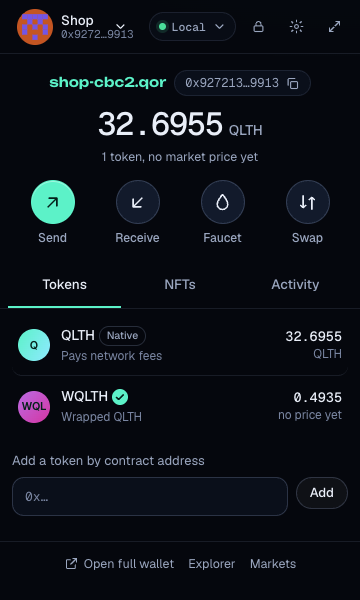
Install with "Load unpacked"
- Download and unzipDownload the .zip above and unzip it into a folder you keep, for example
Documents/qorlith-wallet. The browser loads the extension from that folder, so do not delete it. - Open the extensions pageType
chrome://extensionsin the address bar (Edge:edge://extensions, Brave:brave://extensions). - Turn on Developer modeThe switch is in the top right corner (in Edge, in the left sidebar).
- Click "Load unpacked"Choose the unzipped folder, the one that contains
manifest.json. Qorlith Wallet appears in the list. - Pin it and set up a walletClick the puzzle icon in the toolbar and pin Qorlith Wallet. Open it, then create a new wallet or import your secret key or wallet file from the web wallet.
Updating. Download the new .zip, replace the files in the same folder, then click the reload arrow on the Qorlith Wallet card in the extensions page. Your wallets stay. Removing the extension deletes its wallets from the browser, so export your wallet file in Settings first.
What it can do
- Create or import walletsNew post-quantum keys, a 64-character secret key, a keystore file from the web wallet or CLI, or the key of an account whose key was changed. Several wallets, with a switcher.
- Send and receiveQLTH and any Qorlith token, to an address or a .qor name, with a Max button, the fee up front and a QR code for receiving.
- See what you holdBalance in QLTH, tokens with verified badges and look-alike warnings, your NFTs and your activity in plain words.
- Check before you signEvery transaction is simulated on the node first: what leaves your wallet, approvals you give, and scam patterns. Danger warnings need your confirmation.
- Connect to appsQorlith apps such as Chat and the Explorer use the extension automatically. Each site asks once, and you can revoke it any time in Settings.
- Two networksThe public Qorlith Testnet, and a local development node at 127.0.0.1 for builders.
Security notes
- Your keys never leave the browser. The secret key is generated with
crypto.getRandomValuesand stored only as an encrypted keystore (Argon2id and AES-256-GCM, the same file format as the web wallet and the CLI). Nothing is sent to any server, including ours. - Unlocked only while you use it. The decrypted key lives in the extension's background worker memory and its session storage, which is never written to disk. It is wiped when you lock, when the browser closes, and by auto-lock (15 minutes by default, adjustable in Settings).
- Sites see nothing until you approve. A site gets your address only after you click Connect, and every transaction and message signature opens an approval window that shows the site's origin as the browser reports it. A page cannot pretend to be another site. One approval window per site is open at a time.
- Only sign messages from sites you trust. Signing a message cannot move funds, and message signatures can never be replayed as transactions.
- Small set of permissions.
storagefor your encrypted wallets and settings,alarmsfor auto-lock, network access toqorlith.com(the Qorlith API and node) and127.0.0.1(local development). The page script that provideswindow.qorlithruns on websites so apps can find the wallet; it does not read or send page content. - Keep a backup. Export the encrypted wallet file or write down the secret key. Nobody, including Qorlith, can reset your password.
- Developer mode warning. Chrome may show a notice about extensions in developer mode. That is expected for extensions loaded with "Load unpacked". Only load the .zip from this page.
For developers
The extension injects window.qorlith: the same provider as connect() from assets/connect.js, with request, on, accountsChanged, chainChanged and disconnect, and the same error codes (4001, 4100, 4200, 4900). connect() picks the extension automatically when it is installed.